
NBN Box Lights Meaning: What the Lights on Your NBN Box Mean
If your internet is slow, dropping out or not working, the lights on your NBN box can help you work out where to start.
This guide explains the common lights, what to check first, and when to call your provider or Reconnected.
Quick Answer: What Do NBN Box Lights Mean?
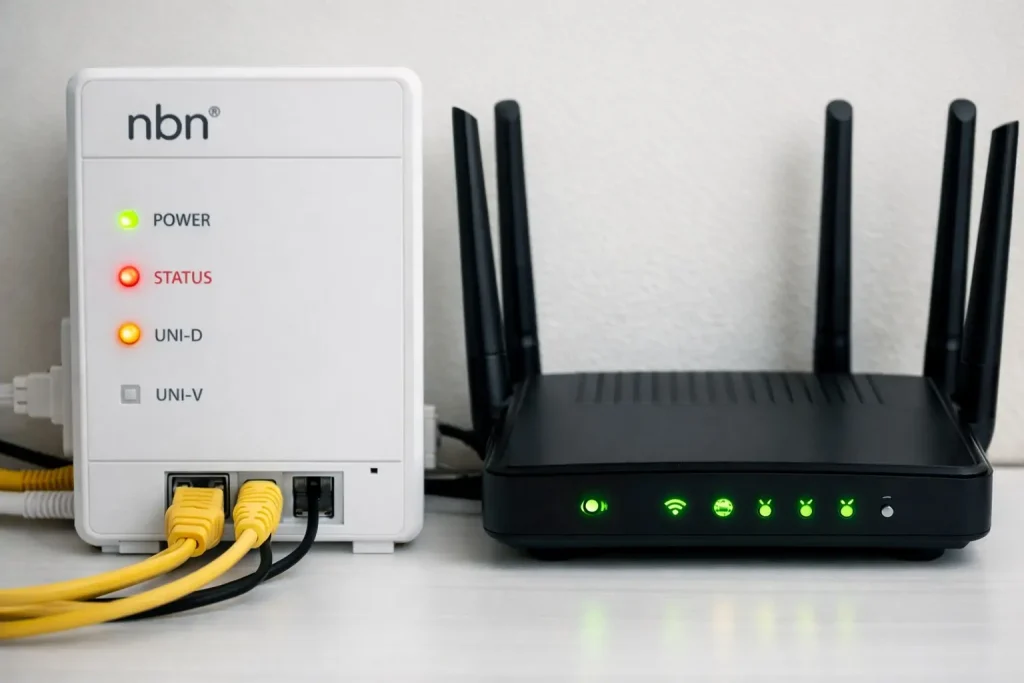
In most cases, a solid power light means the NBN connection box has power. A solid online, optical, DSL or connection light usually means the NBN service is active. Flashing lights often mean the box is starting up, updating or transferring data.
A red light, missing online light or no power light usually means you need to check the basics first, then contact your internet provider if the issue does not clear.
NBN Light Meaning Summary
The names of the lights vary depending on whether you have FTTP, HFC, FTTC, Fixed Wireless, FTTN or FTTB. Use this table as a simple starting point.
| Light or status | Usually means | What to do |
|---|---|---|
| Power light on | The NBN box is receiving power. | No action unless other lights show a fault. |
| No lights | The box may not have power. | Check the power point, power cable and power adaptor. |
| Optical / Online / DSL light on | The NBN connection may be active. | If internet still fails, check your router, Wi‑Fi and devices. |
| Flashing lights | The box may be starting up, updating or transmitting data. | Wait a few minutes before restarting anything. |
| LAN / Port light off | The router may not be connected to the NBN box properly. | Check the Ethernet cable and correct router port. |
| Red light | There may be a connection fault or service issue. | Check for outages and contact your internet provider. |
If the NBN box looks normal but your internet is still unreliable, read our internet dropouts guide or see our Networking & Internet Setup service.
If your provider confirms the service is active but Wi‑Fi is still weak, slow or unreliable, Reconnected can help check your router, mesh Wi‑Fi, device setup and internal network.
FTTP NBN Box Lights
For Fibre to the Premises, the NBN connection box may show Power, Optical and Port lights.
- Power means the box has electricity.
- Optical relates to the fibre connection to the NBN network.
- Port / UNI‑D relates to the connection between the NBN box and your router.
If the optical light is red or not stable, contact your internet provider. If the optical light looks normal but Wi‑Fi is poor, the issue may be router or internal network related.
HFC NBN Box Lights
For Hybrid Fibre Coaxial, the connection box commonly shows Power, Downstream, Upstream and Online lights.
- Power shows whether the box has power.
- Downstream / Upstream relate to data flow on the NBN network.
- Online usually indicates whether the connection is active.
If the online light does not become stable after waiting, check cables and contact your provider if the problem remains.
FTTC NBN Box Lights
For Fibre to the Curb, the NBN connection box may show Power, Connection, DSL and LAN lights.
- Power means the box is powered on.
- Connection relates to the NBN equipment outside.
- DSL shows communication with the NBN access network.
- LAN shows the connection to your router.
What If the NBN Lights Look Normal?
If the lights look normal but the internet is still slow or unreliable, the issue may be inside the property rather than the NBN network.
- Old or underpowered modem/router
- Poor Wi‑Fi coverage or dead zones
- Incorrect router settings
- Device, printer, VoIP or business network issues
- Too many devices competing for Wi‑Fi
When to Call Your Provider vs Reconnected
Call your internet provider when
The NBN box has a red light, no service, no online light, an outage, missing equipment, activation issue or a likely network-side fault.
Call Reconnected when
The NBN service appears active but you still have weak Wi‑Fi, router problems, dropouts, device issues or internal network setup problems.
Be careful with reset buttons
Restarting equipment is different from a full reset. A full reset can remove settings and may require provider support.
Restart safely first
Turn off the router and NBN box, wait at least 30 seconds, turn the NBN box on first, then turn the router back on.
How Reconnected Can Help
Router setup
Modem, router and NBN router setup for homes and small businesses.
Wi‑Fi troubleshooting
Weak signal, dead zones, unreliable coverage and mesh Wi‑Fi advice.
Internal network support
Printers, devices, cabling, switches, office networking and connected systems.
Hardware advice
Practical help choosing better router, mesh Wi‑Fi or business-grade equipment.
For related help, see our Best NBN Modem & Router guide, Networking & Internet Setup service, and Internet Keeps Dropping Out guide.
Still having NBN or Wi‑Fi problems?
If your provider says the NBN service is working but your internet still drops out, feels slow or has poor Wi‑Fi coverage, Reconnected can help check the router, Wi‑Fi setup and internal network.